Build Pipeline Steps
Table of Contents
How to Manage Pipelines via the Wallaroo Dashboard
The Wallaroo Dashboard provides users methods to create, deploy, and other pipeline operations through the Wallaroo Dashboard user interface.
How to Build Pipeline Steps Using the Wallaroo Dashboard
Prerequisites
Before creating a pipeline through the Wallaroo Dashboard, a model must be uploaded into the workspace through the SDK. For more information, see the Wallaroo SDK Essentials Guide.IMPORTANT NOTICE
Pipeline names are not forced to be unique. You can have 50 pipelines all named my-pipeline, which can cause confusion in determining which pipeline to use.
It is recommended that organizations agree on a naming convention and select pipeline to use rather than creating a new one each time. See the SDK guides for more information on how to select an existing pipeline.
To create a pipeline:
From the Wallaroo Dashboard, set the current workspace from the top left dropdown list.
Select View Pipelines from the pipeline’s row.
From the upper right hand corner, select Create Pipeline.
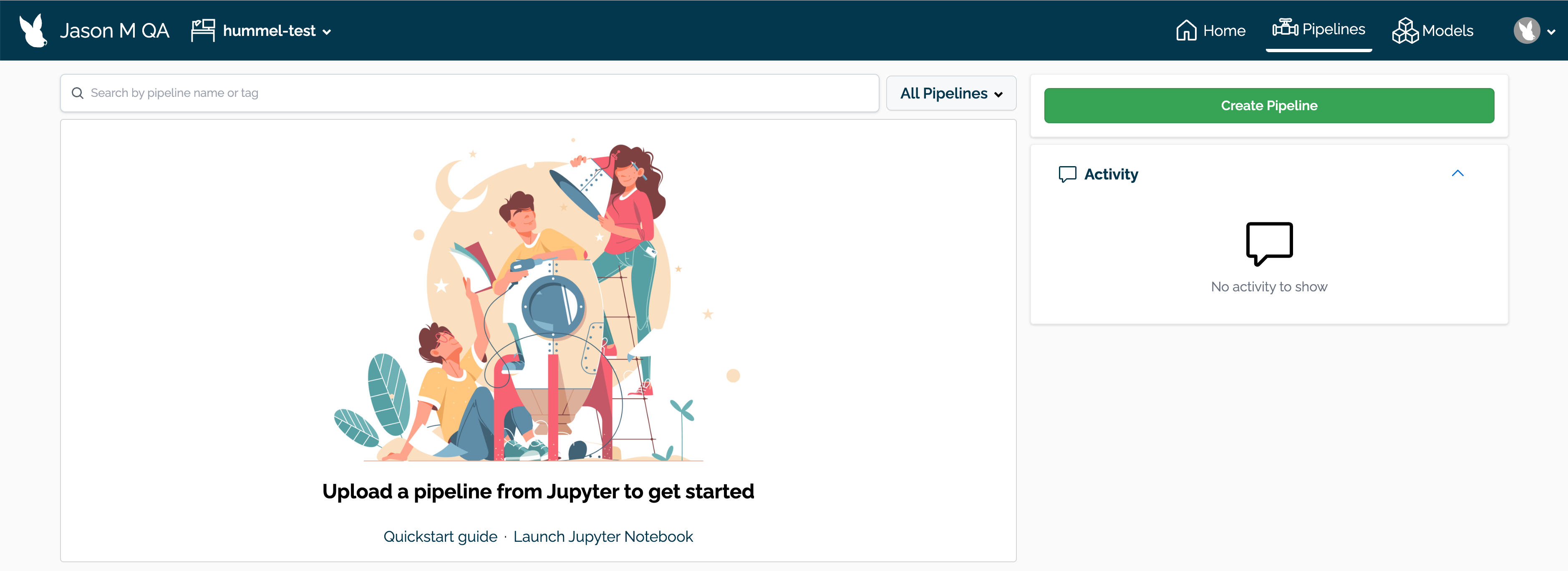
Enter the following:
- Pipeline Name: The name of the new pipeline. Pipeline names should be unique across the Wallaroo instance.
- Add Pipeline Step: Select the models to be used as the pipeline steps.
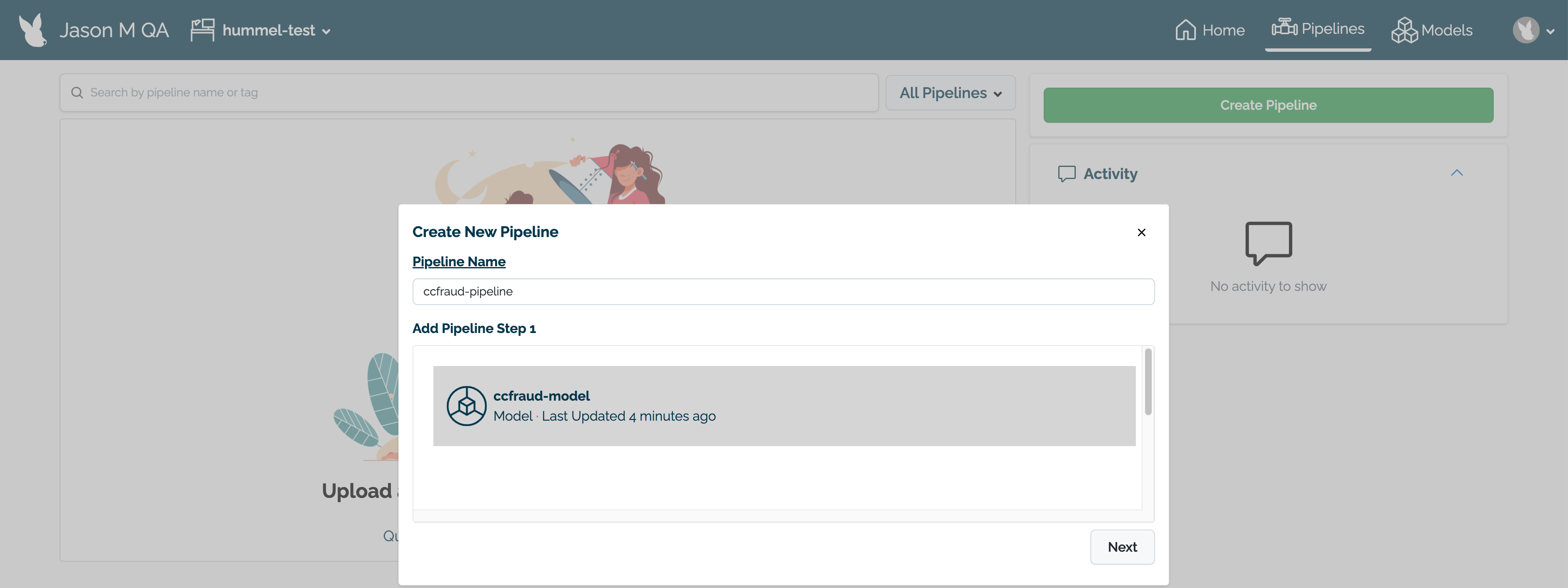
When finished, select Next.
Review the name of the pipeline and the steps. If any adjustments need to be made, select either Back to rename the pipeline or Add Step(s) to change the pipeline’s steps.
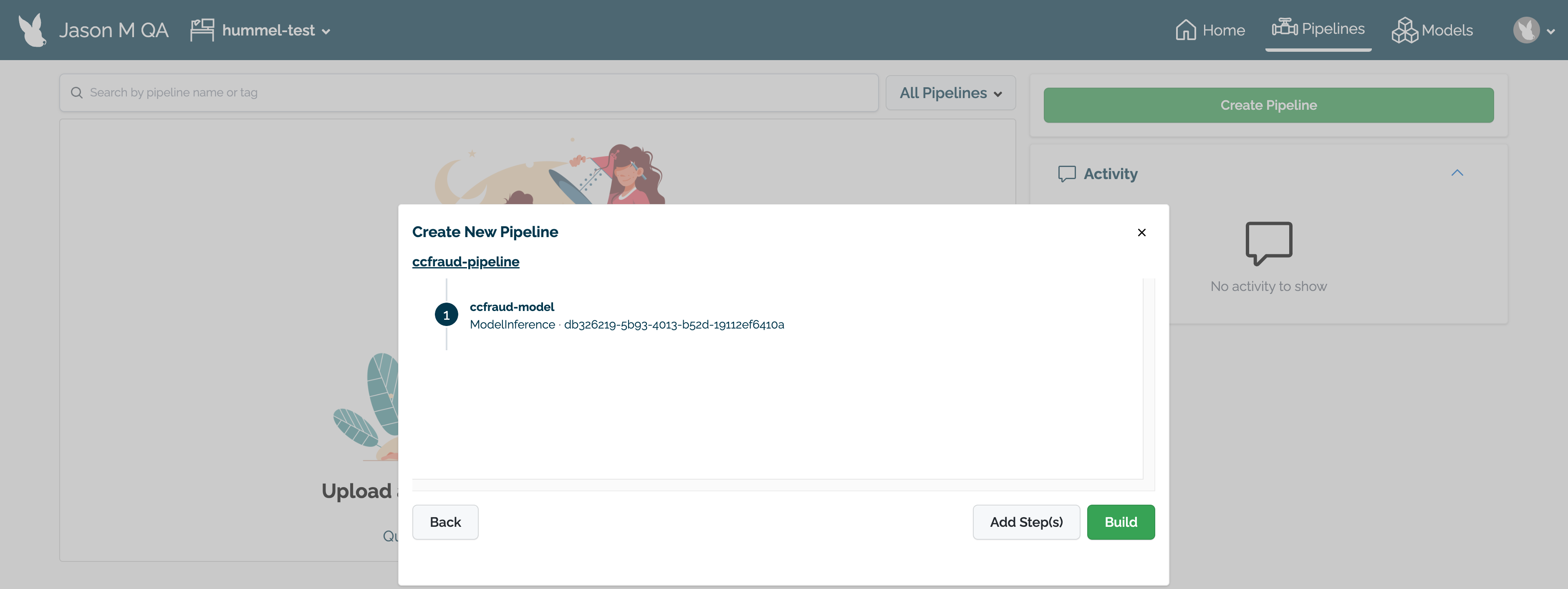
When finished, select Build to create the pipeline in this workspace. The pipeline will be built and be ready for deployment within a minute.
Viewing Pipeline Details through the Wallaroo Dashboard
The following is available from the Pipeline Details page:
- The name of the pipeline.
- The pipeline ID: This is in UUID format.
- Pipeline steps: The steps and the models in each pipeline step.
- Version History: how the pipeline has been updated over time.
How to Build Pipeline Steps via the Wallaroo SDK
The following details pipeline processes.
Pipelines are the method of taking submitting data and processing that data through the models. Each pipeline can have one or more steps that submit the data from the previous step to the next one. Information can be submitted to a pipeline as a file, or through the pipeline’s URL.
The following is subset of pipeline management. For full details, see Wallaroo Pipeline Management.
A pipeline’s metrics can be viewed through the Wallaroo Dashboard Pipeline Details and Metrics page.
Pipeline Naming Requirements
Pipeline names map onto Kubernetes objects, and must be DNS compliant. Pipeline names must be ASCII alpha-numeric characters or dash (-) only. . and _ are not allowed.
Create a Pipeline
New pipelines are created in the current workspace.
NOTICE
Pipeline names are not forced to be unique. You can have 50 pipelines all named my-pipeline, which can cause confusion in determining which workspace to use.
It is recommended that organizations agree on a naming convention and select pipeline to use rather than creating a new one each time.
To create a new pipeline, use the Wallaroo Client build_pipeline("{Pipeline Name}") command.
The following example creates a new pipeline imdb-pipeline through a Wallaroo Client connection wl:
imdb_pipeline = wl.build_pipeline("imdb-pipeline")

imdb_pipeline.status()
{'status': 'Pipeline imdb-pipeline is not deployed'}
Get Pipeline
Pipelines are retrieved via the method wallaroo.client.get_pipeline. This retrieves the most recent version of the specified pipeline in the current workspace that that matches the requested parameters.
For more details on workspaces, see How to Set the Current Workspace.
Get Pipeline Parameters
wallaroo.client.get_pipeline takes the following parameters.
| Parameter | Type | Description |
|---|---|---|
| name | (String) (Required) | The name of the pipeline in the current workspace. |
| version | (String) (Optional) (Default: None) | The specific version of the pipeline to retrieve. If no version is provided, the most recent pipeline version is returned. |
Get Pipeline Returns
wallaroo.client.get_pipeline returns wallaroo.pipeline_version.PipelineVersion for the specified pipeline and version in the current workspace. This includes the following fields:
| Field | Type | Description |
|---|---|---|
| name | String | The pipeline name. |
| created | DateTime | The pipeline creation date and time. |
| last_updated | DateTime | The date and time of the last pipeline update. |
| deployed | Bool | If the pipeline has been deployed or not. If None, then the pipeline has never been deployed before. |
| workspace_id | Int | The workspace id for the workspace the pipeline is assigned to. |
| workspace_name | String | The workspace name for the workspace the pipeline is assigned to. |
| arch | String | The hardware architecture inherited from the ML model added as pipeline step. |
| accel | String | The AI accelerator inherited from the ML model added as pipeline steps. |
| tags | List[String] | A list of the pipeline’s tags. |
| versions | List[String] | A list of the pipeline versions. |
| steps | List[String] | A list of pipeline steps. |
| published | Bool | If the pipeline is published to an OCI Registry (True) or not (False). |
If the pipeline or pipeline version do not match the requested parameters, an error is returned.
Get Pipeline Examples
Get Pipeline by Name Example
The following demonstrates retrieving the most recent pipeline version of the requested pipeline in the current workspace.
wl.get_pipeline(name=pipeline_name)
| name | helper-demo-pipeline-1 |
|---|---|
| created | 2024-07-15 21:44:19.342687+00:00 |
| last_updated | 2024-07-15 21:45:36.935273+00:00 |
| deployed | True |
| workspace_id | 8 |
| workspace_name | john.hummel@wallaroo.ai - Default Workspace |
| arch | x86 |
| accel | none |
| tags | |
| versions | ad133bce-198d-4cf1-be3d-8f553a8baf03, 9153adea-72de-4925-938a-44366c0f4ef7 |
| steps | helper-demo-model-1 |
| published | False |
Get Pipeline By Name Error Example
The following demonstrates requesting a pipeline when no pipeline matching the name exists in the current workspace.
wl.get_pipeline(name="no-such-pipeline")

---------------------------------------------------------------------------

Exception                                 Traceback (most recent call last)

/tmp/ipykernel_208/1835144440.py in <module>
----> 1 wl.get_pipeline(name="no-such-pipeline")


~/.local/lib/python3.9/site-packages/wallaroo/client.py in get_pipeline(self, name, version)
   1357         )
   1358         if pipeline is None:
-> 1359             raise Exception(f"Pipeline {name} not found in this workspace.")
   1360         if version is not None:
   1361             pipeline_version = next(

Exception: Pipeline no-such-pipeline not found in this workspace.
Get Specific Pipeline Version Example
wl.get_pipeline(name=pipeline_name, version="62e0236f-e040-40c1-8666-7b703fd5d2f0")
| name | helper-demo-pipeline-1 |
|---|---|
| created | 2024-07-15 18:15:32.873521+00:00 |
| last_updated | 2024-07-15 18:15:32.873521+00:00 |
| deployed | (none) |
| workspace_id | 25 |
| workspace_name | helper-demo-workspace-1 |
| arch | None |
| accel | None |
| tags | |
| versions | 62e0236f-e040-40c1-8666-7b703fd5d2f0 |
| steps | |
| published | False |
Get Specific Pipeline Version Error Example
The following demonstrates requesting a pipeline version when no pipeline version matching the requested version parameter exists in the current workspace and pipeline.
pipeline_name="helper-demo-pipeline-1"

wl.get_pipeline(name=pipeline_name, version="no-such-version")

---------------------------------------------------------------------------

Exception                                 Traceback (most recent call last)

/tmp/ipykernel_208/2171664880.py in <module>
----> 1 wl.get_pipeline(name=pipeline_name, version="no-such-version")


~/.local/lib/python3.9/site-packages/wallaroo/client.py in get_pipeline(self, name, version)
   1366                 return pipeline
   1367             else:
-> 1368                 raise Exception(
   1369                     f"Pipeline version {version} not found in this workspace."
   1370                 )

Exception: Pipeline version no-such-version not found in this workspace.
List All Pipelines
The Wallaroo Client method list_pipelines() lists all pipelines in Wallaroo in workspaces the SDK user is a member of. The list is filterable by the workspace id or the workspace name, listed in reverse chronological order.
Admin users have unrestricted access to all workspaces. For more details, see Wallaroo Enterprise User Management.
List All Pipelines Parameters
| Parameter | Type | Description |
|---|---|---|
| workspace_id | (Int) (Optional) | The numerical identifier of the workspace to filter by. |
| workspace_name | (String) (Optional) | The name of the workspace to filter by. |
List All Pipelines Returns
The following fields are returned from the list_pipeline method.
| Field | Type | Description |
|---|---|---|
| name | String | The assigned name of the pipeline. |
| deployed | Bool | Whether the pipeline is currently deployed or not. If None, the pipeline has never been deployed. |
| workspace_id | Int | The numerical identifier of the workspace the pipeline is assigned to. |
| workspace_name | String | The workspace name of the workspace the pipeline is assigned to. |
| arch | String | The hardware architecture inherited from the models assigned as pipeline steps. |
| accel | String | The AI accelerator hardware inherited from the models assigned as pipeline steps. |
| created | DateTime | The date and time the pipeline was created. |
| last_updated | DateTime | The date and time the pipeline was updated. |
| tags | List | The list of tags applied to the pipeline. For more details, see Wallaroo SDK Essentials Guide: Tag Management. |
| versions | List | The list of pipeline versions, each version ID in UUID format. |
| steps | List | The list of pipeline steps. |
| published | Bool | If the pipeline was published to the Edge Deployment Registry. See Wallaroo SDK Essentials Guide: Pipeline Edge Publication for more details. |
List All Pipelines Example
The following retrieves all pipelines in workspaces the SDK user is a member of.
wl.list_pipelines()
| name | created | last_updated | deployed | workspace_id | workspace_name | arch | accel | tags | versions | steps | published |
|---|---|---|---|---|---|---|---|---|---|---|---|
| helper-demo-pipeline-1 | 2024-15-Jul 21:44:19 | 2024-15-Jul 21:45:56 | True | 8 | john.hummel@wallaroo.ai - Default Workspace | x86 | none | f5266b8b-07fd-4797-af2b-23a96208fb78, ad133bce-198d-4cf1-be3d-8f553a8baf03, 9153adea-72de-4925-938a-44366c0f4ef7 | helper-demo-model-1 | False | |
| helper-demo-pipeline-1 | 2024-15-Jul 18:43:50 | 2024-15-Jul 18:44:09 | True | 26 | helper-demo-workspace-2 | x86 | none | 023ddae5-56d6-4574-8e59-eb02c004457c, 772dd02f-d7e7-4986-98df-b5cdbccbd2a7 | helper-model-replace | False | |
| helper-demo-pipeline-1 | 2024-15-Jul 18:15:32 | 2024-15-Jul 18:25:07 | True | 25 | helper-demo-workspace-1 | x86 | none | 5c173333-87bd-4bc5-b3fa-7dd651d76d1d, a1b4337a-3379-403c-8d03-bed291092feb, 62e0236f-e040-40c1-8666-7b703fd5d2f0 | helper-model-replace | False | |
| api-pipeline-with-models | 2024-11-Jul 17:48:00 | 2024-11-Jul 17:48:00 | True | 24 | sample-api-workspace-assays | x86 | none | 3fe1411e-b2e8-4a28-a0df-860267b7ad3d | api-sample-model | False | |
| apiinferenceexamplepipeline | 2024-11-Jul 17:41:23 | 2024-11-Jul 17:41:23 | False | 22 | apiinferenceexampleworkspace | x86 | none | f410e6e0-59d2-488e-9ec9-11013078721e | ccfraud | False | |
| sdkinferenceexamplepipeline | 2024-11-Jul 17:27:18 | 2024-11-Jul 17:38:49 | False | 21 | sdkinferenceexampleworkspace | x86 | none | a003db88-d68c-4ee0-b5be-9dd9b44195d7, ef24ecb7-1e4f-4926-b4d9-1e15ab8d6650, b4606f90-70ce-40f7-854f-dab5763ffa89, a6350b91-3fec-4c50-9e7d-b34feb759a1c, 55dc0f1f-5970-4169-af07-35ff54953b00, ccb2c84b-579d-436f-ab07-cccb28628b6d, 893920f4-dd25-4d43-906d-4261b9adf860, cc572647-c758-4b3c-b725-8fff9976a34d | ccfraud | False | |
| api-pipeline-with-models | 2024-11-Jul 17:17:42 | 2024-11-Jul 17:17:42 | False | 20 | test-api-workspace-assays | x86 | none | 385f5383-c800-4ff8-9274-5f51c93465e3 | api-sample-model | False | |
| ccfraudpipeline | 2024-11-Jul 16:51:54 | 2024-11-Jul 17:40:24 | True | 14 | ccfraudworkspace | x86 | none | ff45b328-9d7c-41bb-aa7c-5b5c7e9cbcc4, 004d69fa-67e1-448b-bd38-8fe5299be206, 7e1cec77-d24f-41ae-b9c1-7c4450194e53, c838a411-8515-4633-8a0c-45bc83d3dcde | ccfraudmodel | False |
Filter by workspace id:
wl.list_pipelines(workspace_id=25)
| name | created | last_updated | deployed | workspace_id | workspace_name | arch | accel | tags | versions | steps | published |
|---|---|---|---|---|---|---|---|---|---|---|---|
| helper-demo-pipeline-1 | 2024-15-Jul 18:15:32 | 2024-15-Jul 18:25:07 | True | 25 | helper-demo-workspace-1 | x86 | none | 5c173333-87bd-4bc5-b3fa-7dd651d76d1d, a1b4337a-3379-403c-8d03-bed291092feb, 62e0236f-e040-40c1-8666-7b703fd5d2f0 | helper-model-replace | False |
Filter by workspace name:
wl.list_pipelines(workspace_name=workspace_name)
| name | created | last_updated | deployed | workspace_id | workspace_name | arch | accel | tags | versions | steps | published |
|---|---|---|---|---|---|---|---|---|---|---|---|
| helper-demo-pipeline-1 | 2024-15-Jul 18:15:32 | 2024-15-Jul 18:25:07 | True | 25 | helper-demo-workspace-1 | x86 | none | 5c173333-87bd-4bc5-b3fa-7dd651d76d1d, a1b4337a-3379-403c-8d03-bed291092feb, 62e0236f-e040-40c1-8666-7b703fd5d2f0 | helper-model-replace | False |
Pipeline Steps
Once a pipeline has been created, or during its creation process, a pipeline step can be added. The pipeline step refers to the model that will perform an inference off of the data submitted to it. Each time a step is added, it is added to the pipeline’s models array.
Pipeline steps are not saved until the pipeline is deployed. Until then, pipeline steps are stored in local memory as a potential pipeline configuration until the pipeline is deployed.
Add a Step to a Pipeline
A pipeline step is added through the pipeline add_model_step({Model}) command.
In the following example, two models uploaded to the workspace are added as pipeline step:
imdb_pipeline.add_model_step(embedder)
imdb_pipeline.add_model_step(smodel)

imdb_pipeline.status()

{'name': 'imdb-pipeline', 'create_time': datetime.datetime(2022, 3, 30, 21, 21, 31, 127756, tzinfo=tzutc()), 'definition': "[{'ModelInference': {'models': [{'name': 'embedder-o', 'version': '1c16d21d-fe4c-4081-98bc-65fefa465f7d', 'sha': 'd083fd87fa84451904f71ab8b9adfa88580beb92ca77c046800f79780a20b7e4'}]}}, {'ModelInference': {'models': [{'name': 'smodel-o', 'version': '8d311ba3-c336-48d3-99cd-85d95baa6f19', 'sha': '3473ea8700fbf1a1a8bfb112554a0dde8aab36758030dcde94a9357a83fd5650'}]}}]"}
Clear All Pipeline Steps
The Pipeline clear() method removes all pipeline steps from a pipeline. Note that pipeline steps are not saved until the pipeline is deployed.
Deploy a Pipeline
When a pipeline step is added or removed, the pipeline must be deployed through the pipeline wallaroo.pipeline.Pipeline.deploy(deployment_config, wait_for_status). This allocates resources to the pipeline from the Kubernetes environment and make it available to submit information to perform inferences. For full details on pipeline deployment configurations, see Wallaroo SDK Essentials Guide: Pipeline Deployment Configuration.
Deploy a Pipeline Parameters
The method wallaroo.pipeline.Pipeline.deploy takes the following parameters.
| Parameter | Type | Description |
|---|---|---|
| deployment_config | wallaroo.deployment_config.DeploymentConfig (Optional) | The number of resources to allocate to the cluster such as the number of cpus, amount of ram, etc, along with how many replicas, autoscaling, and other settings. For complete details, see Wallaroo SDK Essentials Guide: Pipeline Deployment Configuration. |
| wait_for_status | Boolean (Optional Default: True) | If True, the Python script will wait until the pipeline is finished successfully deploying before continuing or reaches the timeout. If False, continue on with the Python script. |
Deploy Pipelines Asynchronously
By default, wallaroo.pipeline.Pipeline.deploy sets wait_for_status=True. In this situation, the Python code pauses and display the deployment process until either:
- The pipeline successfully deploys, at which point the Python code continues.
- The pipeline deployment reaches its timeout.
- The pipeline errors out for one or more reasons. In these situations:
- The Python code is stopped if the exception is not caught.
- An error is displayed.
If wait_for_status=False, then Python code will not wait for the success or failure of the pipeline to deploy, but proceed to the next instruction without pause.
In these situations, before performing an inference request, use pipeline status to verify that the pipeline status is Running.
For example, the following example:
- Deploys three pipelines with
wait_for_status=False. - Before performing an inference request, verify the pipeline
sample_pipeline_1status isstatus='Running'.
for pipe, deploy_config in [(sample_pipeline_1, deployment_config_1), (sample_pipeline_2, deployment_config_2), (sample_pipeline_2, deployment_config_3)]:
    pipe.deploy(deployment_config=deploy_config, wait_for_status=False)

# perform other code

# check the pipeline status before performing an inference

if sample_pipeline_1.status()['status'] == 'Running':
   sample_pipeline_1.infer(sample_data)
Deploy a Pipeline Deployment Defaults
Deployment configurations default to the following*.
| Runtime | CPUs | Memory | GPUs |
|---|---|---|---|
| Wallaroo Native Runtime** | 4 | 3 Gi | 0 |
| Wallaroo Containerized Runtime*** | 2 | 1 Gi | 0 |
*: For Kubernetes limits and requests.
**: Resources are always allocated for the Wallaroo Native Runtime engine even if there are no Wallaroo Native Runtimes included in the deployment, so it is recommended to decrease these resources when pipelines use Containerized Runtimes.
***: Resources for Wallaroo Containerized Runtimes only apply with a Wallaroo Containerized Runtime is part of the deployment.
Deploy a Pipeline with a New Deployment Configuration
Pipelines do not need to be undeployed to deploy new pipeline versions or pipeline deployment configurations. For example, the following pipeline is deployed, new pipeline steps are set, and the pipeline deploy command is issues again. This creates a new version of the pipeline and updates the deployed pipeline with the new configuration.
# clear all steps
pipeline.clear()
# set modelA as the step
pipeline.add_model_step(modelA)
# deploy the pipeline - the version is saved and the resources allocated to the pipeline
pipeline.deploy()
# clear the steps - this configuration is only stored in the local SDK session until the deploy or create_version command is given
pipeline.clear()
# set modelB as the step
pipeline.add_model_step(modelB)
# deploy the pipeline - the pipeline configuration is saved and the pipeline deployment updated without significant downtime
pipeline.deploy()
Model Deployment Architecture Inheritance
Deployment configurations inherit the model’s architecture setting. This is set during model upload by specifying the arch parameter. By default, models uploaded to Wallaroo default to the x86 architecture.
The following model operations inherit the model’s architecture setting.
- Model Deployment: Model deployment and Model Deployment Deployment Configuration inherit the the model’s architecture. No specification of the architecture is required for model deployment.
- Pipeline Publishing: The Wallaroo engine set when a pipeline is containerized and published to an Open Container Initiative (OCI) Registry inherits the model’s architecture setting.
The following example shows uploading a model set with the architecture set to ARM, and how the deployment inherits that architecture without additional deployment configuration changes. For this example, an ONNX model is uploaded.
import wallaroo

housing_model_control_arm = (wl.upload_model(model_name_arm,
                                        model_file_name,
                                        framework=Framework.ONNX,
                                        arch=wallaroo.engine_config.Architecture.ARM)
                                        .configure(tensor_fields=["tensor"])
                        )

display(housing_model_control_arm)
| Name | house-price-estimator-arm |
| Version | 163ff0a9-0f1a-4229-bbf2-a19e4385f10f |
| File Name | rf_model.onnx |
| SHA | e22a0831aafd9917f3cc87a15ed267797f80e2afa12ad7d8810ca58f173b8cc6 |
| Status | ready |
| Image Path | None |
| Architecture | arm |
| Acceleration | None |
| Updated At | 2024-04-Mar 20:34:00 |
Note that the deployment configuration settings, no architecture is specified. When pipeline_arm is displayed, we see the arch setting inherited the model’s arch setting.
pipeline_arm = wl.build_pipeline(arm_pipeline_name)

# set the model step with the ARM targeted model
pipeline_arm.add_model_step(housing_model_control_arm)

#minimum deployment config for this model
deploy_config = wallaroo.DeploymentConfigBuilder().replica_count(1).cpus(1).memory("1Gi").build()

pipeline_arm.deploy(deployment_config = deploy_config)

    Waiting for deployment - this will take up to 45s .......... ok

display(pipeline_arm)
| name | architecture-demonstration-arm |
|---|---|
| created | 2024-03-04 20:34:08.895396+00:00 |
| last_updated | 2024-03-04 21:52:01.894671+00:00 |
| deployed | True |
| arch | arm |
| accel | None |
| tags | |
| versions | 55d834b4-92c8-4a93-b78b-6a224f17f9c1, 98821b85-401a-4ab5-af8e-1b3126727069, 74571863-9eb0-47aa-8b5a-3bdaa7aa9f03, b72fb0db-e4b4-4936-a7cb-3d0fb7827a6f, 3ae70818-10f3-4f61-a998-dee5e2f00daf |
| steps | house-price-estimator-arm |
| published | True |
Deploy Current Pipeline Version
By default, deploying a Wallaroo pipeline will deploy the most current version. For example:
sample_pipeline = wl.build_pipeline("test-pipeline")
sample_pipeline.add_model_step(model)
sample_pipeline.deploy()
sample_pipeline.status()

{'status': 'Running',
 'details': None,
 'engines': [{'ip': '10.12.1.65',
   'name': 'engine-778b65459-f9mt5',
   'status': 'Running',
   'reason': None,
   'pipeline_statuses': {'pipelines': [{'id': 'imdb-pipeline',
      'status': 'Running'}]},
   'model_statuses': {'models': [{'name': 'embedder-o',
      'version': '1c16d21d-fe4c-4081-98bc-65fefa465f7d',
      'sha': 'd083fd87fa84451904f71ab8b9adfa88580beb92ca77c046800f79780a20b7e4',
      'status': 'Running'},
     {'name': 'smodel-o',
      'version': '8d311ba3-c336-48d3-99cd-85d95baa6f19',
      'sha': '3473ea8700fbf1a1a8bfb112554a0dde8aab36758030dcde94a9357a83fd5650',
      'status': 'Running'}]}}],
 'engine_lbs': [{'ip': '10.12.1.66',
   'name': 'engine-lb-85846c64f8-ggg2t',
   'status': 'Running',
   'reason': None}]}
Deploy Previous Pipeline Version
Pipeline versions are deployed with the method wallaroo.pipeline_variant.deploy(deployment_name, model_configs, config: Optional[wallaroo.deployment_config.DeploymentConfig]). Note that the deployment_name and model_configs are required. The model_configs are retrieved with the wallaroo.pipeline_variant.model_configs() method.
The following demonstrates retrieving a previous version of a pipeline, deploying it, and retrieving the deployment status.
pipeline_version = pipeline.versions()[7]

display(pipeline_version.name())
display(pipeline_version)
pipeline_version.deploy("houseprice-estimator", pipeline_version.model_configs())
display(pipeline.status())
| name | houseprice-estimator |
| version | 92f2b4f3-494b-4d69-895f-9e767ac1869d |
| creation_time | 2023-11-Sep 20:49:17 |
| last_updated_time | 2023-11-Sep 20:49:17 |
| deployed | False |
| tags | |
| steps | house-price-rf-model |
{'status': 'Running',
 'details': [],
 'engines': [{'ip': '10.244.3.211',
   'name': 'engine-578dc7cdcf-qkx5n',
   'status': 'Running',
   'reason': None,
   'details': [],
   'pipeline_statuses': {'pipelines': [{'id': 'houseprice-estimator',
      'status': 'Running'}]},
   'model_statuses': {'models': [{'name': 'house-price-rf-model',
      'version': '616c2306-bf93-417b-9656-37bee6f14379',
      'sha': 'e22a0831aafd9917f3cc87a15ed267797f80e2afa12ad7d8810ca58f173b8cc6',
      'status': 'Running'}]}}],
 'engine_lbs': [{'ip': '10.244.4.243',
   'name': 'engine-lb-584f54c899-2rtvg',
   'status': 'Running',
   'reason': None,
   'details': []}],
 'sidekicks': []}
Pipeline Status
Once complete, the pipeline status() command will show 'status':'Running'.
Pipeline deployments can be modified to enable auto-scaling to allow pipelines to allocate more or fewer resources based on need by setting the pipeline’s This will then be applied to the deployment of the pipelineccfraudPipelineby specifying it'sdeployment_config` optional parameter. If this optional parameter is not passed, then the deployment will defer to default values. For more information, see Manage Pipeline Deployment Configuration.
In the following example, the pipeline imdb-pipeline that contains two steps will be deployed with default deployment configuration:
imdb_pipeline.status

<bound method Pipeline.status of {'name': 'imdb-pipeline', 'create_time': datetime.datetime(2022, 3, 30, 21, 21, 31, 127756, tzinfo=tzutc()), 'definition': "[{'ModelInference': {'models': [{'name': 'embedder-o', 'version': '1c16d21d-fe4c-4081-98bc-65fefa465f7d', 'sha': 'd083fd87fa84451904f71ab8b9adfa88580beb92ca77c046800f79780a20b7e4'}]}}, {'ModelInference': {'models': [{'name': 'smodel-o', 'version': '8d311ba3-c336-48d3-99cd-85d95baa6f19', 'sha': '3473ea8700fbf1a1a8bfb112554a0dde8aab36758030dcde94a9357a83fd5650'}]}}]"}>

imdb_pipeline.deploy()
Waiting for deployment - this will take up to 45s ...... ok

imdb_pipeline.status()

{'status': 'Running',
 'details': None,
 'engines': [{'ip': '10.12.1.65',
   'name': 'engine-778b65459-f9mt5',
   'status': 'Running',
   'reason': None,
   'pipeline_statuses': {'pipelines': [{'id': 'imdb-pipeline',
      'status': 'Running'}]},
   'model_statuses': {'models': [{'name': 'embedder-o',
      'version': '1c16d21d-fe4c-4081-98bc-65fefa465f7d',
      'sha': 'd083fd87fa84451904f71ab8b9adfa88580beb92ca77c046800f79780a20b7e4',
      'status': 'Running'},
     {'name': 'smodel-o',
      'version': '8d311ba3-c336-48d3-99cd-85d95baa6f19',
      'sha': '3473ea8700fbf1a1a8bfb112554a0dde8aab36758030dcde94a9357a83fd5650',
      'status': 'Running'}]}}],
 'engine_lbs': [{'ip': '10.12.1.66',
   'name': 'engine-lb-85846c64f8-ggg2t',
   'status': 'Running',
   'reason': None}]}
Manage Pipeline Deployment Configuration
For full details on pipeline deployment configurations, see Wallaroo SDK Essentials Guide: Pipeline Deployment Configuration.
Troubleshooting Pipeline Deployment
If you deploy more pipelines than your environment can handle, or if you deploy more pipelines than your license allows, you may see an error like the following:
LimitError: You have reached a license limit in your Wallaroo instance. In order to add additional resources, you can remove some of your existing resources. If you have any questions contact us at community@wallaroo.ai: MAX_PIPELINES_LIMIT_EXCEEDED
Undeploy any unnecessary pipelines either through the SDK or through the Wallaroo Pipeline Dashboard, then attempt to redeploy the pipeline in question again.
Undeploy a Pipeline
When a pipeline is not currently needed, it can be undeployed and its resources turned back to the Kubernetes environment. To undeploy a pipeline, use the pipeline undeploy() command.
In this example, the aloha_pipeline will be undeployed:
aloha_pipeline.undeploy()

{'name': 'aloha-test-demo', 'create_time': datetime.datetime(2022, 3, 29, 20, 34, 3, 960957, tzinfo=tzutc()), 'definition': "[{'ModelInference': {'models': [{'name': 'aloha-2', 'version': 'a8e8abdc-c22f-416c-a13c-5fe162357430', 'sha': 'fd998cd5e4964bbbb4f8d29d245a8ac67df81b62be767afbceb96a03d1a01520'}]}}]"}
Get Pipeline URL Endpoint
The Pipeline URL Endpoint or the Pipeline Deploy URL is used to submit data to a pipeline to use for an inference. This is done through the pipeline _deployment._url() method.
In this example, the pipeline URL endpoint for the pipeline ccfraud_pipeline will be displayed:
ccfraud_pipeline._deployment._url()

'http://engine-lb.ccfraud-pipeline-1:29502/pipelines/ccfraud-pipeline'